How to Organize Design Boards That Actually Help You (and Your Clients) Decide
What's the Difference Between a Mood Board, Product Board, and Concept Board?
Before you organize, you need to understand what you're actually organizing.
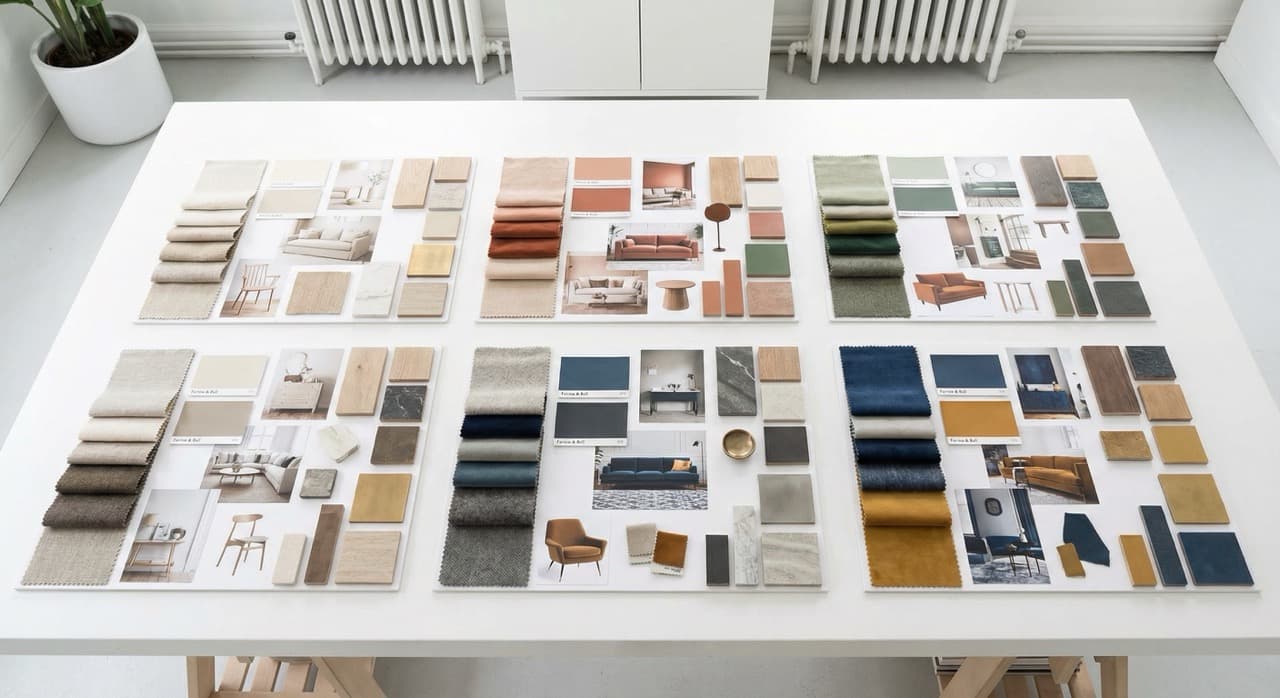
A mood board is purely inspirational.
It conveys aesthetic direction through images, textures, color swatches, and design references. Mood boards don't typically include product specifications or pricing. They answer the question, "What's the vibe we're going for?" They're great for getting alignment on style in the early project phases.
A product board is transactional.
It shows specific, purchasable items with part numbers, finishes, dimensions, cost, and sourcing information. Product boards answer practical questions:
- Which sofa?
- What shade of paint?
- What lighting fixtures?
They're what you build when clients have approved direction and need to commit to actual selections.
A concept board sits in the middle.
It combines mood-inspired imagery with specific product recommendations. It shows selected items in room context, includes some aesthetic references, and introduces pricing without requiring final decisions. Concept boards are where most client conversations actually happen.
The confusion happens when these categories get mixed up.
Most interior designers end up creating all three types across a single project. A mood board that includes prices feels premature (clients aren't ready to commit). A product board without any inspiration reference feels cold and clinical. A concept board that's disorganized or missing critical specs slows decision-making to a crawl.
Visual product boards let you create all three types in one place. You can start with inspiration images, add product clips from vendor sites, layer in specifications and pricing, and organize everything into meaningful sections.
When you're building boards at scale, tools that help you source products faster integrate seamlessly with this organizational approach.
Organize Boards by Room, Not by Product Category
Many designers start organizing boards by product type: one board for seating, one for lighting, one for flooring. This seems logical until you realize your client is sitting in the dining room trying to visualize how everything works together.
Organizing by room makes decision-making significantly faster.
A client looking at "the dining room board" sees the table, chairs, lighting, area rug, wall color, and window treatments all at once. They can evaluate proportions, color harmony, and material variety holistically. They can imagine themselves in the space.
This is how people actually experience interiors, so it's how boards should be structured.
Within each room board, you can then organize sections by function if needed:
- Seating
- Lighting
- Textiles
- Architectural elements
But the room is the primary organizing principle.
This approach also maps to your project workflow.
Clients make decisions room by room. You can present the master bedroom board, get sign-off, then move to the living room board. It's sequential and manageable.
If you're designing multiple spaces that share a cohesive aesthetic (think: open floor plan where living and dining flow together), create one unified board for that zone. The goal is always: can the client see the complete picture all at once?
Organize every product, sample, and board in one workspace.
Clip products from any vendor site, organize boards, and create client-ready proposals — all in one place.
Try TradeHub FreeStructure Boards for Decision-Making, Not Just Inspiration
Here's a discipline that separates professional boards from amateur ones: every image on your board should serve a decision.
When you're building a room concept board, ask yourself for each item: "Does the client need to approve this? Or is this just mood?" If it's "just mood," does it clarify something ambiguous about the approved mood, or is it redundant?
A designer might include twelve furniture arrangement sketches "to show different options." But if you've already decided on the layout, each sketch is noise, not signal. Your client is trying to decide on sectional color and upholstery. Extra floor plans are distracting.
Here's a practical framework: each section of your board should have a primary decision and supporting information.
- Primary decision: Which dining table? (Show 3 to 5 finalist options with part numbers and pricing.)
- Supporting information: Table dimensions relative to room size. Finish options available. Delivery timeline. Budget implications.
- Optional inspiration: One or two reference images showing similar tables in dining spaces, if the client might be uncertain about proportion or how it relates to light quality.
That's it. You've compressed what could be a sprawling collection of images into a purposeful narrative.
When clients see boards structured this way, they know what you're asking them to decide.
They can compare options side by side. They understand the cost implications. The board moves a project forward instead of creating "just look at these pretty ideas and tell me what you feel" conversations that go in circles.
Include Pricing and Specs Alongside Visuals
This is non-negotiable for professional product boards.
Your client is looking at a stunning sofa image. They love the color and silhouette. Then they ask, "How much?" and you have to close the board, dig through email, find a PDF specification sheet, and come back with a number.
You've broken momentum and made the process feel disorganized.
Every product on your board needs at minimum:
- Product name and vendor
- Part/SKU number
- Available finishes and options
- Key dimensions
- Wholesale cost
- Client-facing price
- Estimated lead time or stock status
This information should be visible right there alongside or underneath the image. A simple text overlay or caption works. Some designers use a linked spreadsheet. TradeHub surfaces this information directly on visual product boards, so specs and budget data live with the images.
When pricing is visible, clients stop asking "How much?" and start asking better questions:
- "Can we find something similar at a lower price?"
- "Is the lead time manageable?"
These are productive conversations. Hidden pricing creates frustration.
Specs matter equally.
A stunning office chair means nothing if the dimensions don't fit the desk or the height is wrong for the task. Include the numbers so decisions are informed.
Use Sections to Organize Content Within Boards
A room board could easily contain fifty items: wall color, paint finish, every light fixture, every textile, every furniture piece, hardware, accessories. If all fifty items are sorted in one flat list, it's overwhelming.
Sections create hierarchy and scanability.
Within your dining room board, create sections for:
- Dining table and chairs (where the decision-making anchors)
- Lighting (pendants above the table, possibly wall sconces)
- Window treatments (curtains or shades)
- Flooring and rugs (or reference if it's already decided)
- Wall color and finishes
- Accessories and decor
A client scrolling the board sees these clear categories. They know they're looking at the seating section, then they move to lighting, then textiles. The information is chunked cognitively, which makes processing faster.
Sections also let you show alternatives cleanly.
Under "Dining Chairs," you can show three options the client is choosing between, rather than burying them in a list of sixty items.
Sectioning features in design tools let you organize product boards this way. You can drag products into sections, label them clearly, and even set section-specific budgets.
This is helpful for communicating: "The lighting section is running 12 percent over budget. Would you like to see alternatives?"
Understanding how to use browser extensions for product sourcing complements this sectioning strategy perfectly.
Present Boards to Clients Digitally in a Structured Way
The way you present the board shapes how the client engages with it.
If you email a PDF board, the client views it passively.
They can look but can't interact. They can't click to see the full spec sheet. They can't ask questions inline. The conversation happens offline, often via email threads that scatter feedback.
Digital boards that live in a shared space are better.
The client can comment on specific items. You can update the board and they see the changes immediately, no new PDF to manage. You can share a link instead of emailing increasingly large files.
Even better: boards in a tool designed for design collaboration and decision-making.
TradeHub boards can be shared with clients, and they can see pricing context and leave feedback on specific items. This keeps the whole project in one place instead of scattered across email, documents, and spreadsheets.
When you present a board, guide the client through it.
Don't just send a link and say "Let me know what you think." Say, "I've organized the dining room by product category. The seating section shows three chair options I'm recommending. Can you review those and let me know your preference by Friday?"
This frames what decision is needed and when. This structured approach works especially well when combined with strong client presentation tips.
If you're presenting boards synchronously (in a video call or in-person):
- Walk through the board section by section
- Explain your reasoning for each recommendation
- Stop and ask if they want to explore alternatives before moving forward
This is active collaboration, not passive browsing.
Common Mistakes to Avoid
Too many options.
When you show a client six sofa options, you've created decision paralysis, not assistance. Narrow down to three finalists (or two, if one is clearly superior). Show your professional recommendation clearly. Explain why you picked those three. Let the client choose from a curated set, not a catalog.
No pricing context.
A five thousand dollar sofa paired with a fifty dollar accent chair on the same board creates false equivalency. Without pricing visible, the client doesn't understand budget allocation. Always show cost so the client can see where dollars are concentrated.
Disorganized visual hierarchy.
If everything on the board is the same size and emphasis, nothing stands out as a primary decision. Make key items larger or more prominent. Use white space. Use consistent layout so the board is easy to scan.
Mixing decision stages.
Don't put "approved" items and "still deciding" items together without clear labels. A client might think they approved the paint color months ago, not realizing you're still asking for input. Use labels, checkmarks, or different visual treatment (color, opacity, borders) to show status.
No inspiration support.
Pure product boards can feel cold. Even if your client has approved the aesthetic direction, including one or two reference images that show the final products in context helps them imagine the space. Don't overdo it, but a little inspiration reinforces the mood you're creating.
Unclear pricing method.
Some boards show wholesale cost. Some show client price. Some show both. Some show pricing as "call for quote." Clients don't understand the distinction. Be transparent. If you're showing mark-up, explain it. If you need to call for a quote, note that clearly. Ambiguous pricing creates friction and follow-up questions.
No lead time or availability info.
A client falls in love with a dining table that's backordered for six months. If that information isn't on the board, they find out later and adjust their timeline or pick something else. Always include lead time, current stock status, or manufacturing timeframe.
Boards that are too large to navigate.
If your product board has a hundred items, it's really a catalog, not a decision-making tool. Break it into multiple boards or sub-boards organized by room or phase. Smaller, focused boards are more usable.
Organize every product, sample, and board in one workspace.
Clip products from any vendor site, organize boards, and create client-ready proposals — all in one place.
Try TradeHub FreeStructure Boards to Show Budget Impact
Clients always want to know: "Is this in budget?"
A well-structured board makes this transparent.
Within each section, as you add items, a running total of wholesale cost and client-facing price helps you (and the client) understand budget utilization.
For example, the "dining room seating" section might show:
- Dining table: 8,500 (wholesale), 17,000 (client price)
- Four dining chairs: 1,200 each (wholesale), 2,400 each (client price)
- Bench (if applicable): 1,800 (wholesale), 3,600 (client price)
Section subtotal: 13,700 (wholesale), 27,400 (client price)
If the overall client budget for the dining room is 35,000, you can see immediately that seating is at 78 percent of budget, leaving 7,600 for lighting, window treatments, flooring, and accessories.
This clarity prevents overspending and forces honest conversations about priorities.
Some designers don't like showing the full markup in boards.
That's fair. You can show client pricing only. But you need to track margins internally, and TradeHub's budget tracking feature lets you do this while only showing clients the information you choose to share.
Boards as a Proposal Foundation
When a client is ready to move from "let's explore" to "let's commit," your organized boards become a proposal foundation.
Boards that include specs and pricing can be formatted into a formal proposal in minutes.
You add terms, timeline, payment schedule, and signature line. The client reviews items they've already seen and approved on the board. Signing is the natural next step.
If your boards are disorganized, scattered across emails, or missing pricing, creating a proposal feels like starting from scratch.
You're re-gathering information, re-organizing it, and hoping the client still remembers what they liked six weeks ago.
Professional boards at every phase means your proposal is a formality, not a major reconstruction effort. TradeHub's boards can be tied directly to proposals with e-signature capability, so the path from decision to commitment is smooth.
Moving Boards Through Project Phases
A single design project might have several versions of the same board.
Initial concept board (100 percent inspiration, 50 percent specific products):
Shows the aesthetic direction and introduces a few key product recommendations. Goal is "Do you like this vibe?"
Refined board (70 percent specific products, 30 percent inspiration):
Most decisions are narrowed. Pricing is shown. Client is seeing the final direction with a few alternatives remaining.
Final board (100 percent specific products):
Everything is approved and ordered. This board becomes the project record and the basis of the proposal and contract.
TradeHub lets you version boards.
You can duplicate a previous board, make updates, and save it with a date stamp. You're never overwriting the earlier version, so if the client asks "What did we originally talk about?" you can show them.
Some designers think "one board throughout the project" is efficient.
In reality, a board that's useful for inspiring a client in week two is useless for finalizing details in week eight. Allow boards to evolve as the project crystallizes. This isn't inefficiency. It's responsive design thinking.
Boards and Collaboration With Your Team
If you have junior designers, assistants, or contractors, well-structured boards make delegation straightforward.
Instead of vague requests, you can give specific direction:
Instead of saying "Can you research some accent chairs for the master bedroom?" you say "The master bedroom board is shared in TradeHub. I've sketched out the preliminary aesthetic and dimensions. Can you find four chair options that fit these criteria and add them to the seating section by Thursday?"
Your team member can see the full context, understand what's been decided, and where they're filling in gaps. They can add items directly to the board. You review, approve, and adjust. No back-and-forth email with attachments and "Do you like this one?"
Boards also onboard new team members faster.
Instead of explaining a project verbally, you give them a link. They can see the full vision, all decisions made so far, and what still needs work.
FAQ
Q: Should I use one board per room or organize by project phase? A: Room-based boards are most intuitive for clients. However, if you're designing a small space or a single room project, you might also organize by phase (concept, refined, final) within that one room. The goal is always clarity about what the client is deciding and when.
Q: How many product options should I show the client? A: Three is ideal for most decisions. This gives the client genuine choice without overwhelming them. If you show more than five options for a single product, you're not making a strong enough recommendation.
Q: Can I use boards just for internal project management, or are they only for client-facing? A: Both. Many designers create detailed internal boards to manage specifications and sourcing, then create a simplified client-facing version that focuses on final selections and design impact. TradeHub boards can be configured either way.
Q: What happens to the board after the client approves? A: Archive it or lock it as read-only. This becomes your project record. If the client asks "Did we decide on that wallpaper?" six months in, you have the reference. Keep it accessible but prevent accidental edits.
Q: How often should I update boards during a project? A: After client feedback and before presentations. If you collect feedback on Tuesday, update the board by Wednesday, and present Thursday, the client sees that their input was incorporated. Boards that stay stale for weeks feel neglected.
Q: Should I include brands and sources on product boards? A: Yes, absolutely. The client should know where items are coming from. If a dining table is from a high-end Italian manufacturer, that's part of what they're choosing. If you're sourcing from a local maker, that's valuable context too.
Related Reading
- How to Source Products Faster for Your Design Projects
- Client Presentation Tips for Design Professionals
- How Browser Extensions Are Changing the Way Designers Source Products
Want to streamline your design board organization? Visual product boards with built-in sections and budget tracking make it easy to create client-ready presentations that drive decisions and showcase your professional process. Explore TradeHub.
Organize every product, sample, and board in one workspace.
Join thousands of interior designers who use TradeHub to source products, manage projects, and present to clients with confidence.
Start Your Free TrialFree during beta. No credit card needed.