Spreadsheets vs. Design Software for Interior Designers
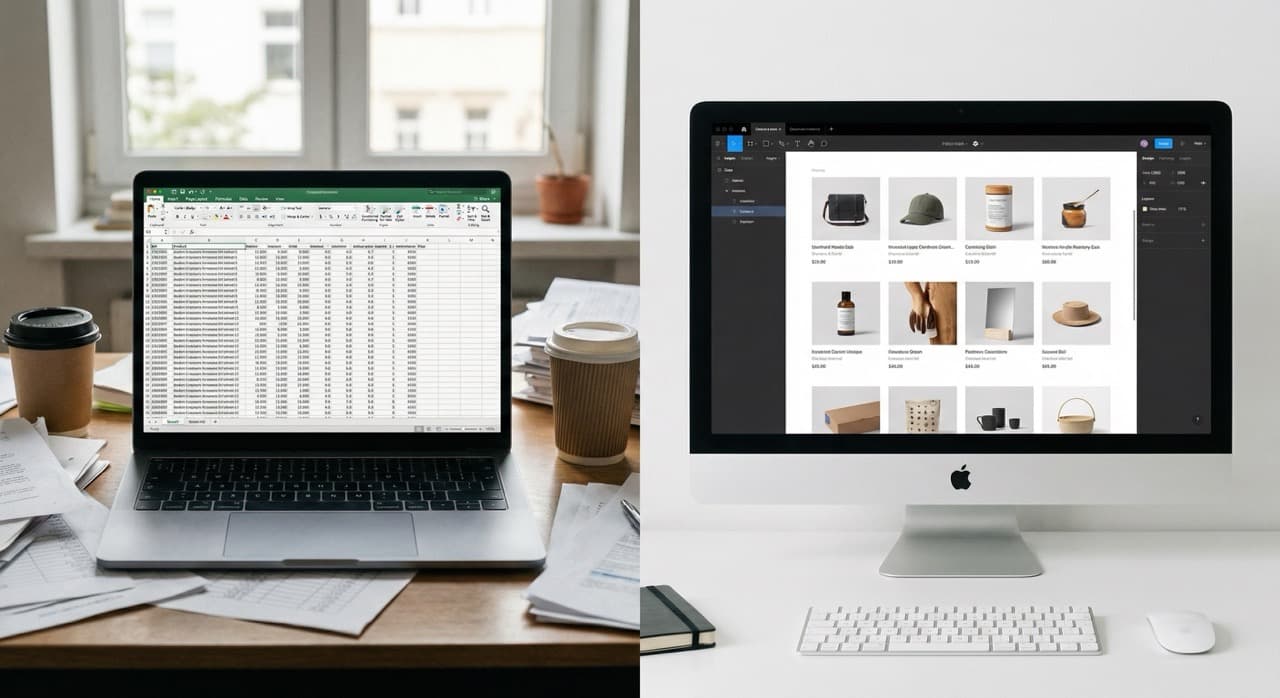
Why Designers Default to Spreadsheets
Interior designers have been managing projects with spreadsheets for two decades for straightforward reasons:
- Spreadsheets are free or nearly free
- They're infinitely flexible (if you can imagine a structure, you can build it in Excel)
- They don't require learning new software (everyone knows how to use spreadsheets)
- They live on your computer (you own the data and don't depend on a vendor)
For a solo designer running one or two projects at a time, spreadsheets work. You can track product lists, costs, client contacts, vendor information, and project timelines in separate sheets and it functions.
You might have one spreadsheet called "Master Product List" with columns for product name, vendor, wholesale cost, retail price, category, and notes. For each project, you make a copy and populate it with the products you've specified. You track payments with another sheet. Vendor information goes in another. It's not elegant, but it works.
But the design industry has evolved:
-
Clients now expect visual collaboration. You need to show them digital mood boards and product selections rather than printed boards. They want to see options in context and make decisions online rather than waiting for in-person meetings.
-
Teams have expanded. Designers now work with junior designers, design assistants, and project managers who all need access to the same information.
-
Complexity has increased. A small residential project might involve 50 to 100 product selections across categories, price points, and procurement timelines. Managing that in spreadsheets becomes genuinely difficult.
This is where tools like design board organization solutions become essential for keeping everything visual and collaborative.
Where Spreadsheets Break Down
Spreadsheet-based project management hits hard limits that constrain designers' ability to work effectively and scale their business.
Visual product management is nearly impossible. Interior design is inherently visual. Clients need to see how products look together, not just read product names in a list.
Spreadsheets are text-based. You can add images to cells, but it's clunky and slow. You can't easily arrange products to visualize how they interact. You can't create collections or boards that show design concepts.
You end up creating separate mood boards in design software, maintaining product lists in spreadsheets, and manually connecting the two. This creates version control nightmares where the mood board shows one set of products but the spreadsheet shows another.
Margin and markup tracking is inaccurate and time-consuming. Tracking costs and markups across dozens of products requires careful spreadsheet management. You need to capture:
- Wholesale cost
- Retail price
- The price you're charging the client
- Markup and margin percentages
In a spreadsheet, this requires manual formulas that are easy to get wrong. If you update a cost midway through a project, you have to manually update the formula or the margin calculation becomes stale.
Most designers avoid detailed margin tracking in spreadsheets because it's just too much work. This means they don't actually know their profitability by product or project.
Team collaboration is fragmented and error-prone. When multiple people need access to project information, spreadsheets break down:
- You email versions back and forth
- Someone opens version A while someone else is editing version B
- Updates get lost
- Two people might be specifying products for the same space simultaneously, creating duplicates or conflicts
You can put spreadsheets in a shared drive, but then you deal with multiple people accessing simultaneously, file locks, and version conflicts. Shared spreadsheets feel like they should work, but they create more problems than they solve once more than one person is involved.
Client collaboration is limited. Clients can't easily access and understand spreadsheets. If you send a client a spreadsheet with 50 products, they're overwhelmed. They can't visualize how things work together. They can't provide meaningful feedback. They might edit the spreadsheet and mess it up.
You end up exporting spreadsheet data into presentation software or email to communicate with clients, which means client data lives in multiple places.
Searching and filtering are limited. As your product database grows, you might have hundreds or thousands of items. Finding what you need in a spreadsheet is slow:
- "Which vendors do I buy fabric from?"
- "What upholstered furniture did I specify in the last six months?"
- "Which products did that client approve?"
Spreadsheet filters work, but they're clunky. You have to remember to save views and re-apply filters constantly. Designers spend surprising amounts of time scrolling through spreadsheets trying to find product information.
Historical data gets messy and unreliable. After a few years of projects, you have dozens of spreadsheets. Some are archived on your computer. Some are in an old drive. Some are on Dropbox.
Finding past project information is tedious. You can't easily extract insights (which vendors do you use most, which products are consistently profitable, which categories are you specifying most) because data is scattered across files.
Mobile access is nearly impossible. Interior design happens on-site. You're at a client's home, looking at their space, making decisions. You need to check product availability or confirm a specification.
With spreadsheets, the experience is terrible. Spreadsheets on mobile are impossible to navigate. Compare this to a mobile app where you can pull up product information, specifications, and project status instantly.
Audit trails and accountability disappear. When a client asks "when did we decide on this product?" or "who approved this change?" spreadsheets don't have answers.
You have a row showing the product, but no history of when it was added, who added it, or what changed. If someone deletes something, there's no way to recover it or know what happened.
Vendor management becomes scattered. You maintain vendor contact information somewhere. Pricing information in another place. Terms in another. Credentials and login information in yet another place.
Designers often use password managers for credentials and spreadsheets for everything else, which means vendor information is fragmented. When you need to contact a vendor or check pricing, you're hunting across multiple sources.
Reporting and analysis are minimal. Once a project is done, spreadsheets don't easily tell you what happened:
- You can't quickly generate reports showing project profitability
- You can't analyze timeline performance or product categories you used most
- You can't identify which clients are most profitable or which projects ran smoothly
You could build these reports manually (more spreadsheets, more formulas, more work), but most designers just don't bother. This means they make future decisions without data to back them up.
Ditch the spreadsheets — source and organize visually.
Clip products from any vendor site, organize boards, and create client-ready proposals — all in one place.
Try TradeHub FreeWhat Purpose-Built Design Software Solves
Purpose-built design management software is built specifically for how interior designers work. It typically includes visual product management, project organization, team collaboration, client access, and reporting.
Visual product boards and inspiration collections. Design software lets you build visual boards where you collect, arrange, and organize products:
- You can see how colors, textures, and styles interact
- You can reorganize products to test different combinations
- You can create boards for different design concepts or project phases
- Teams can comment on boards, providing feedback on selections
- Clients can view boards and provide approvals or requests for changes
This is how design actually works. It's visual, iterative, and collaborative.
Integrated cost and margin tracking. Purpose-built tools track wholesale costs, client pricing, markups, and margins all in one place.
When you add a product to a board, you add cost and client pricing. The system automatically calculates margin. If costs change, you update once and all projects using that product reflect the new cost. You can generate reports showing actual margins by product, category, and project.
This means you actually know your profitability and can make informed pricing decisions.
Team collaboration without version control nightmares. Multiple team members can work on the same project simultaneously. Everyone sees live updates.
- If one person adds a product, everyone else sees it immediately
- You can assign tasks to team members (source finishes, get client approval on selections) and track completion
- You can comment on specific products or sections, keeping discussion threaded and organized
- You can control permissions so some team members see cost information while others see only selections and client-facing information
Client collaboration portal. Clients access a dedicated project view rather than a spreadsheet. They see visual boards, not product lists. They can provide feedback and approvals directly in the system.
Designers can control what clients see (maybe they don't see costs or alternative options). Clients feel engaged because they're seeing beautiful presentations, not spreadsheet tables. Projects move faster because client decision-making happens in a streamlined process rather than through email chains and meetings.
Smart search and filtering. You can instantly search across all projects for:
- Products from a specific vendor
- Products in a specific price range
- Items in a specific color family
- Products you've used for past clients
These searches happen across your entire product library, not just the current project. Smart search saves enormous amounts of time and surfaces insights spreadsheets never could.
Mobile access and on-site decisions. Apps built for design work let you access project information on your phone while you're at a client's home. You can check product specifications, see what's been approved, pull up images, and make decisions without sitting at a laptop.
Audit trails and change history. Purpose-built systems log who changed what and when:
- If a product was removed, there's a record
- If approvals were given, there's a timestamp
- If costs changed, you can see the old value and the new one
This builds accountability and makes it easy to handle disputes ("I approved that product on March 15 at 2pm" with proof).
Integrated vendor management. Vendor information, pricing, credentials, contact information, and terms all live in one place. When you work with a vendor, all their information is accessible. Credentials are stored securely rather than in a spreadsheet or password manager.
Reporting and analytics. After a project closes, you can generate reports showing product categories used, margins achieved, timeline performance, and cost vs. estimate. Over time, this data reveals patterns:
- Which product categories are most profitable
- Which types of projects scale best with your team
- Where your timeline estimates are accurate and where they're too optimistic
This data drives better future decisions.
Centralized project and client information. All information about a client and their projects lives in one place. You can see their contact information, project history, preferences, previous selections, and past approvals. New team members can come up to speed quickly by reviewing a client's file.
Why the Cost of Switching Matters Less Than You Think
Many designers hesitate to switch from spreadsheets because there's a real cost to change:
- You have to learn new software
- You have to migrate existing data
- You have to train your team
- There's time and money involved
But the cost of not switching often exceeds the cost of switching.
The Time Cost of Spreadsheet Management
A designer managing 10 to 15 projects annually, with 50 to 100 products per project, is spending 10 to 15 hours per month on spreadsheet management. That includes:
- Creating copies
- Filling in products
- Updating costs
- Tracking client approvals
- Maintaining vendor lists
- Manually connecting mood boards to product specifications
Over a year, that's 120 to 180 hours, or three to four weeks of full-time work.
For a designer charging $150 per hour, that's $18,000 to $27,000 in pure administrative overhead that could be eliminated. By comparison, implementing a budget tracking solution or moving to purpose-built software shows immediate ROI.
Design software often costs $2,000 to $10,000 per year depending on features and team size. Even at the high end, that pays for itself in less than a month of recovered time from better project management.
The Cost of Mistakes
When information exists in multiple spreadsheets or disconnected systems, mistakes happen:
- You specify a product twice by accident
- You quote a client a price but have a different cost recorded in another spreadsheet
- You lose track of which products have been ordered
These mistakes cost time to fix and sometimes cost money in reorders or unhappy clients.
The Cost of Limited Scaling
Designers who rely on spreadsheets hit a ceiling. Once you're managing more than 20 to 30 projects annually or more than one or two team members, spreadsheets become such a burden that you can't grow without working 70-hour weeks.
Purpose-built software makes it possible to manage 50 to 100 projects annually without massive time investment. That's the difference between a sole practitioner business and a small firm with real growth potential.
A comprehensive interior designer tech stack accelerates this scaling significantly.
The Client Satisfaction Cost
Clients working with designers using spreadsheets get spreadsheet-quality experience:
- They see lists, not visual boards
- They wait for email responses to feedback rather than seeing updates immediately
- They don't feel engaged with the design process
Clients working with designers using purpose-built software get modern, visual, collaborative experience. They feel like they're working with a professional firm, not a solo practitioner. This perception drives referrals and repeat business.
How to Evaluate and Choose Design Management Software
If you're considering moving beyond spreadsheets, evaluating software can feel overwhelming. Here are key factors to consider.
Does it solve your specific pain points? Different designers have different biggest frustrations:
- If visual product management is your main problem, look for software with strong mood board and collection features
- If client collaboration is the issue, prioritize software with excellent client portals
- If margin tracking is what's missing, make sure the software has robust cost and pricing tracking
Don't pay for features you don't need, but make sure it solves your top three problems.
Is it easy to use? This matters more than feature completeness. Software that's powerful but complicated gets used wrong or abandoned. The best software is intuitive enough that a new team member can figure it out without extensive training.
Can you import existing data? Moving years of project data to new software is painful. Ask whether the software can import from spreadsheets or other sources. Can you bulk upload products? Can you organize historical data? A smooth data migration makes switching practical.
Does it have team collaboration features? If you're a solo designer, individual features matter most. If you have a team, collaboration features become critical:
- Can multiple people work on the same project?
- Can you assign tasks?
- Can you comment on specific items?
- Is there permission control so you can limit who sees what?
Is there a client-facing component? Some software is team-only. Other software includes beautiful client-facing portals where clients see visual presentations, not spreadsheets. If client experience matters to your positioning, prioritize this.
What's the mobile experience? Can you access the system on your phone? Is the app native or just a mobile version of the web app? Can you actually do useful work on mobile or is it just for viewing information?
How's the reporting and analytics? Can you generate reports on project profitability, timelines, or product usage? Some software is better at reporting than others. If data-driven decision-making is important to you, this matters.
What's the cost structure? Some charge per project, some per user, some per month. Calculate what it would actually cost for your business. A per-user model might be expensive if you have a large team but cheap if it's solo.
How's the customer support? If you get stuck, can you reach a human? Do they respond quickly? Is there a knowledge base? For software that's core to your business, responsive support matters.
Is there an integration ecosystem? Can it talk to your accounting software, CRM, or other tools you use? Integrations reduce manual data entry and keep information in sync across systems.
What's the learning curve? Can you get productive in a day or does it require weeks of training? This matters both for you and for team members you'll need to train.
Why Spreadsheets Are Sometimes Fine (And When They're Not)
This isn't a blanket "everyone should abandon spreadsheets" argument. Some design practices still work fine with spreadsheets.
Spreadsheets work well if:
- You're a brand-new designer with one or two projects
- Your team is just you
- You don't need sophisticated cost tracking
There's no point in buying software you won't fully utilize.
Spreadsheets also work as a supplementary system even if you use design software. Many designers use software for the main project but maintain additional spreadsheets for specific analysis or specialized tracking. That's fine as long as the spreadsheet isn't your primary source of truth.
Spreadsheets don't work well if:
- You're managing multiple projects
- You have a team
- You're trying to track margins carefully
- You want to give clients beautiful visual access to their project
At that point, spreadsheets become a constraint on your business.
The question to ask is: How much time and headaches are spreadsheets costing you?
If the answer is "not much, I've got a system and it works," keep doing what you're doing.
If the answer is "I spend way too much time managing spreadsheets and my team is confused about what products have been approved," that's the signal that something purpose-built would pay for itself quickly.
FAQ
Q: Can you really migrate data from spreadsheets to design software?
A: Usually, yes. Most modern design software can import spreadsheets in CSV or Excel format. However, the import usually requires some data cleanup. You might need to reformat your spreadsheets to match the software's data structure. It's not a perfectly seamless process, but it's usually doable in a few hours of work rather than days. Ask the software vendor specifically about their data import process before committing.
Q: Will design software integrate with the other tools I use?
A: Some integrations are common (connections to accounting software, CRM systems, design tools like Adobe). Other integrations depend on the specific software. Ask about integrations that matter to you before choosing. Some software has open APIs that allow custom integrations if the vendor doesn't offer the one you need.
Q: Is it hard to train a new team member on design software compared to spreadsheets?
A: Good design software is usually easier to train on than spreadsheets. Spreadsheets have confusing menus, people build weird custom structures, and it's hard to know what you're looking at. Good design software has a logical structure and visual interface that's more intuitive. Plan for a few hours of training to get a new person productive, similar to spreadsheets.
Q: What if the design software I choose goes out of business?
A: This is a legitimate concern. Ask whether you can export your data if needed. Some software promises data portability; some don't. For critical business data, prefer software with data export features and transparent data ownership. Also, look for software from established vendors with stable funding and customer bases, not one-person side projects.
Q: Can I use multiple tools together, like design software for visual boards and spreadsheets for cost tracking?
A: You can, but it creates the version control and duplicate work problems you're trying to solve. The whole point of switching to purpose-built software is to consolidate information so everything lives in one place. Using both means you're still maintaining multiple systems. That said, if a single tool doesn't solve all your needs, it's sometimes better to use two specialized tools than one mediocre tool that tries to do everything.
Q: How long does it take to see value from switching to design software?
A: You'll see some value immediately (visual organization, client presentation), but maximum value comes after three to six months when you have several projects in the system and you start using reporting and analytics features. The first month is usually spent learning and data migration. By month three, if you've been using it consistently, you should see clear time savings and better project profitability visibility.
Q: Is there design software that's free or very cheap?
A: Some software is free at limited scale (a few projects, limited team members). But truly free, full-featured design software is rare. Most free options are either very basic or have significant limitations. You get what you pay for. A $100 to $200 per month software investment for a designer is reasonable, especially compared to the time savings.
Related Reading
- How to Organize Design Boards That Actually Help You Decide
- The Interior Designer's Tech Stack: Essential Tools for 2026
- Spreadsheets vs. Design Software for Interior Designers
Tired of managing projects across multiple spreadsheets and tools? TradeHub brings visual product boards, integrated cost tracking, team collaboration, and beautiful client presentations all into one purpose-built platform designed for interior designers. Learn how TradeHub simplifies design project management.
Ditch the spreadsheets — source and organize visually.
Join thousands of interior designers who use TradeHub to source products, manage projects, and present to clients with confidence.
Start Your Free TrialFree during beta. No credit card needed.